
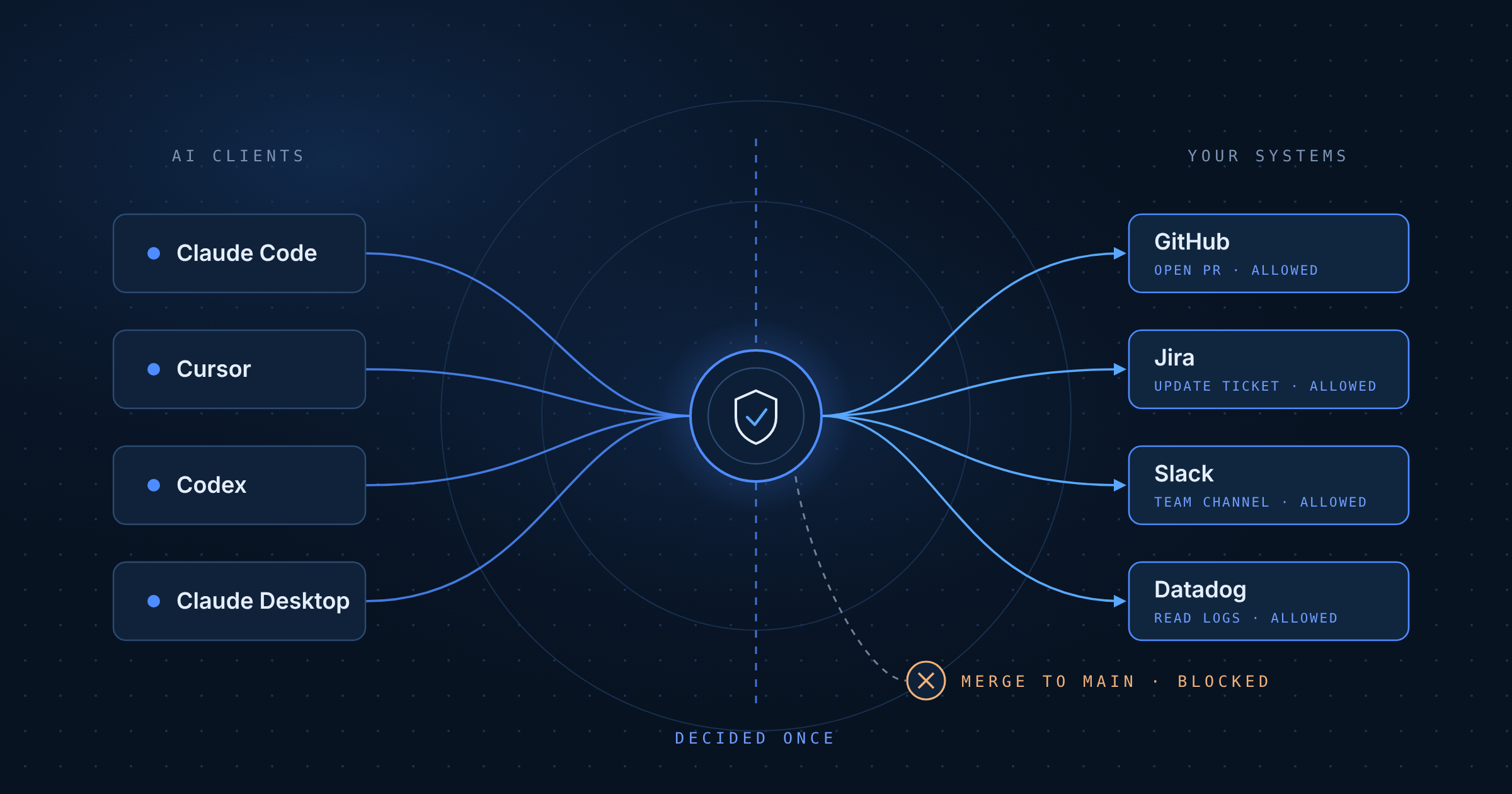
If you use Claude Code every day, you know the rhythm. You give it a task, look away, and come back a few minutes later to find it stopped, waiting for you to approve a command. You hit yes. It runs for another minute. It stops again.
There’s a better way to handle this than clicking yes all day or turning the prompts off. You can make the “is this OK?” decisions once, in one place, and have them apply to every developer and every AI tool they use, whether that’s Claude Code, Cursor, Codex or Claude Desktop.
Prompts slow you down, so people turn them off
Permission prompts exist for a good reason. An agent with access to your repos, your tickets and your chat can do real damage if it misreads a task.
But a prompt only protects you if someone actually reads it. After the twentieth approval in an hour, most people stop reading. They hit yes on reflex. At that point the prompt isn’t a guardrail anymore. It’s a speed bump.
So developers do the reasonable thing and make the prompts go away. They add broad allow rules. They switch to bypass mode or launch with --dangerously-skip-permissions. Anthropic’s own docs are clear that bypass mode is for isolated containers and VMs only, and that it “offers no protection against prompt injection or unintended actions.”
That’s the trade most teams end up making without really deciding to: speed now, and hope nothing goes wrong. And when the agent can reach GitHub, Jira, Slack or production monitoring, “something going wrong” looks like a force-push to main, a closed sprint full of deleted tickets, or a customer’s data pasted into a public channel because a web page told the agent to do it.
Why per-call approval doesn’t scale
The deeper problem is who’s making the decisions and how often.
With prompts, every developer makes governance calls on every tool call, alone, in the middle of their work. Should the agent be allowed to merge this PR? Comment on that ticket? Post to that channel? Ten developers answer those questions ten different ways, hundreds of times a day, and nobody writes the answers down.
That gives you the worst of both worlds. The work is slow, and the rules are inconsistent. When something does go wrong, there’s no record of what the agent did or who said yes.
A better approach: decide once, in one place
Instead of approving actions one at a time, connect your coding agent to your systems through a governed control point. With Dtwo, Claude Code connects to Dtwo instead of to each app, so every tool call goes through your team’s policies before it reaches GitHub, Jira, Slack or anything else.
Now the decisions get made once, by the people who should make them, and they apply to everyone. Here’s what that can look like for an engineering team:
- GitHub: the agent can create branches, push to them, open PRs and reply to review comments. It can’t merge to main, delete branches or change repo settings.
- Jira: it can create and update tickets and move them through the workflow. It can’t delete tickets.
- Slack: it can read and post in your team’s channels. It can’t post in shared channels with customers or partners.
- Datadog: read-only. It can search logs and pull metrics while debugging, and that’s it.
Rules can also be dynamic. With Dynamic Safeguards, a rule can depend on what the agent has already done in the session, not just the one action in front of it. For example: once the agent has queried the production database, it can no longer push to public repositories. A per-call prompt can’t see that kind of context. You’d need to remember it yourself, on approval number forty.
And for the few actions where you really do want a person in the loop, Dtwo can ask for human approval on just those. The agent sends the user a link, they sign in and approve in the browser, and the work continues. The difference is that this happens for the handful of actions that deserve it, not for every read.
What one control point gets you
The obvious win is fewer interruptions. The agent runs, and the policies do the checking.
You also get rules that are much finer than a yes/no prompt. You can decide which actions, on which repos, with what data, instead of “allow GitHub” or “block GitHub.”
The rules are the same for everyone. A new hire’s agent follows the same policies as everyone else on the team from day one, and when you change a rule, it changes for the whole team.
And you get an audit trail. Every tool call is logged with who made it and what the policy decided, so when someone asks “what did the agent do?” you can answer with a record instead of a guess.
Getting set up with Dtwo
Here’s the practical setup. It’s the same for every client, so a developer who uses Cursor in the morning and Claude Code in the afternoon gets the same rules in both.
1. Put your systems behind Dtwo. Start a free trial, then add the systems your agents use. We have step-by-step MCP server guides for GitHub, Atlassian, Slack, Linear, Datadog and dozens more, plus a guide for connecting any MCP server.
2. Add your policies. Start from the policy catalog or describe the rule you want in plain English and Dtwo writes the policy.
3. Connect your AI clients to Dtwo. Follow the rollout guide for Claude Code, Claude Desktop, Cursor or Codex. It covers pushing Dtwo to everyone so nobody has to set it up by hand, and turning off other connectors so all tool access goes through your policies.
Take the guardrail job off your employees’ plates
Permission prompts ask each developer to be a security reviewer on every tool call. That’s slow, it wears people out, and in the end it pushes them to turn the prompts off.
Making the decisions once, in one place, gets you an agent that runs without interruption and guardrails that actually hold, the same for everyone, with a record of what happened. Your developers get their flow back, and you get to say yes to letting agents do more real work.
Want your coding agents to run without the prompts? Start a free trial.
FAQ
How do I let Claude Code run without permission prompts, safely?
Connect Claude Code to your systems through Dtwo and pre-approve the Dtwo tools in Claude Code. Your team’s policies then decide what each tool call can do, so the agent runs without stopping to ask, and only the rare high-risk action goes to a person for approval.
How do I connect Claude Code, Cursor, Codex or Claude Desktop to a governed gateway?
Sign up for Dtwo, add the systems your agents use (GitHub, Jira, Slack, Datadog and so on) using the MCP server guides, then add Dtwo to each AI client as a single MCP server. Admins can use the rollout guide to roll it out to the whole organization and turn off other connectors so every tool call goes through the same policies.